
Skip to content
DataMiner Dojo

More results...

Generic selectors
Exact matches only
Search in title
Search in content
Post Type Selectors
Search in posts
Search in pages
Search in posts
Search in pages
Log in
Menu
  • Updates & Insights
  • Questions
  • Learning
    • E-learning Courses
    • Tutorials
    • Open Classroom Training
    • Certification
      • DataMiner Fundamentals
      • DataMiner Configurator
      • DataMiner Automation
      • Scripts & Connectors Developer: HTTP Basics
      • Scripts & Connectors Developer: SNMP Basics
      • Visual Overview – Level 1
      • Verify a certificate
    • YouTube Videos
    • Solutions & Use Cases
      • Solutions
      • Use Case Library
    • Agility
      • Learn more about Agile
        • Agile Webspace
        • Everything Agile
          • The Agile Manifesto
          • Best Practices
          • Retro Recipes
        • Methodologies
          • The Scrum Framework
          • Kanban
          • Extreme Programming
        • Roles
          • The Product Owner
          • The Agile Coach
          • The Quality & UX Coach (QX)
      • Book your Agile Fundamentals training
      • Book you Kanban workshop
    • >> Go to DataMiner Docs
  • DevOps
    • About the DevOps Program
    • Sign up for the DevOps Program
    • DataMiner DevOps Support
    • Feature Suggestions
  • Downloads
  • Swag Shop
  • PARTNERS
    • Business Partners
    • Technology Partners
  • Contact
    • Sales, Training & Certification
    • DataMiner Support
    • Global Feedback Survey
  • >> Go to dataminer.services

Displaying Variables in a Visualization Title

Solved80 views3 hours ago
1
Matt Murphy96 2 days ago 0 Comments

I've got a page in an LCA I've been building that sorts devices into Region and Market via variables (call them TV1 and TV2 for now) and I'd like to enhance the readability of the return information by cascading one or both of the Variables into the Title of the Visualization. Does anyone know if there's a way to format the Visualization Title to access those variables? What I'm going for is something along the lines of "Displaying devices from TV2 market in TV1 region". 

Alternately, could some of the Column Headers for the returned data be used in the same way?

Matt Murphy Selected answer as best 3 hours ago

1 Answer

  • Active
  • Voted
  • Newest
  • Oldest
3
Wout Mahieu [SLC] [DevOps Catalyst]10.77K Posted 1 day ago 3 Comments

Hi Matt,

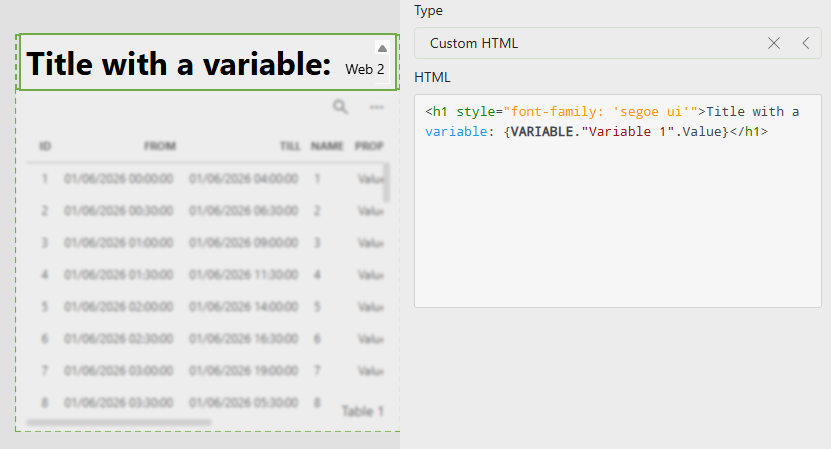
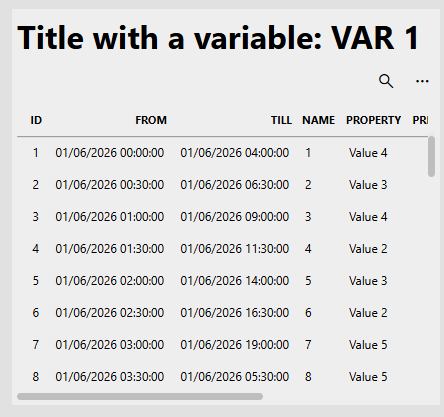
It isn't possible to user variables or other data in the title of visualizations. Instead you can add a Text of HTML component on the page that displays the desired text combined with some modified margins in the component theme.

Setup
Result
Matt Murphy Selected answer as best 3 hours ago
Matt Murphy commented 1 day ago

I tried this out and can see that it does work to call a variable – unfortunately it doesn't work for my situation because the variable isn't set before the LCA page loads, it's set afterwards via button press and the HTML doesn't refresh when the new table result is loaded. I appreciate your help – I'll keep this info around and see if I can integrate it into things down the road.

Wout Mahieu [SLC] [DevOps Catalyst] commented 13 hours ago

The content of the HTML component should update automatically whenever the referenced variable updates. I was able to confirm this on a local setup. What DataMiner (web) version are you using where this isn't working for you?

Matt Murphy commented 4 hours ago

This deployment is running 10.5.0.0-16294. I'll retry with a separate static variable just to make sure I didn't miss something simple.

Update: Retried with both static and dynamic variables and it worked this time, so this one's good to go. Thanks for your help with it.

You are viewing 1 out of 1 answers, click here to view all answers.
Please login to be able to comment or post an answer.

My DevOps rank

DevOps Members get more insights on their profile page.

My user earnings

0 Dojo credits

Spend your credits in our swag shop.

0 Reputation points

Boost your reputation, climb the leaderboard.

Promo banner DataMiner DevOps Professiona Program
DataMiner Integration Studio (DIS)
Empower Katas
Privacy Policy • Terms & Conditions • Contact

© 2026 Skyline Communications. All rights reserved.

DOJO Q&A widget

Can't find what you need?

? Explore the Q&A DataMiner Docs

[ Placeholder content for popup link ] WordPress Download Manager - Best Download Management Plugin