

Hello,
I am experiencing an issue after upgrading my development environment from Visual Studio 2022 + DIS 3.1.18 to Visual Studio 2026 + DIS 3.1.21.
Previous setup (working correctly)
- Visual Studio 2022
- DIS 3.1.18
- Solution structure:
- A .sln file with multiple .csproj projects (GQI and Automation scripts)
- Projects were created using the DataMiner templates
- XML script files were located at the root of the solution
- Projects were located in a subfolder named "Actions"
- Project SDK used: <Project Sdk="Microsoft.NET.Sdk">
After upgrade
- Visual Studio 2026
- DIS 3.1.21
I created a new project using the "DataMiner Automation Script Project" template.
Observed differences
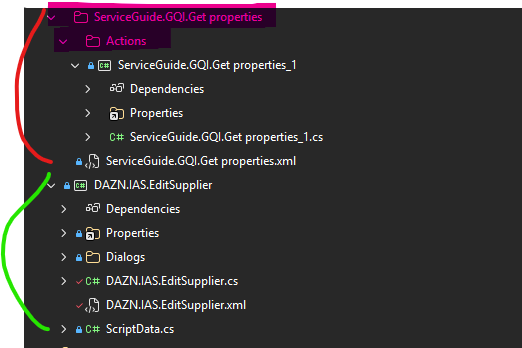
- The "Actions" folder is no longer created
- The XML script file is now located inside the project folder
- Project SDK used: <Project Sdk="Skyline.DataMiner.Sdk">
Screenshot (red old project / green new project).
Issue
The new project builds successfully
The DIS Publish action appears to run without errors
However, the generated package seems to be empty
The generated description.txt file contains:
DIS_AppPackage_DEV package version: 0.0.0-CU0
---------------------------------
Package creation time: 2026-03-30 09:23:04
---------------------------------
File Versions:
No files are listed in the package.
Could you help me understand what i might be doing wrong?
Thank you.

Hi Kévin,
Adding a new project via File > New Project... will create a new Automation script project that uses the DataMiner SDK. This is a new type of project with a different structure than the now legacy Automation script projects.
The legacy and sdk automation projects should not be mixed. (Normally, DIS should show a popup message indicating this "Incompatible project types detected".)
When you want to add an automation script to a legacy solution, select the solution in Solution Explorer and right click. From the context menu, select Add > New DataMiner Automation Script.... This will add a legacy automation script to the solution.
Kind regards,

There are some differences between legacy and SDK automation script solutions:
– A legacy automation solution can contain multiple scripts. With SDK automation scripts, if you want to create a package (.dmapp) that contains multiple automation scripts, these need to be put in a package project (more info about package projects can be found here: http://aka.dataminer.services/packageprojects).
– A legacy automation script project could contain multiple C# exe blocks whereas an SDK automation script project can only have one.
To migrate a solution that consists of multiple automation scripts, you would need to create a package project that contains the automation scripts that have been converted to the new SDK-style.
We still support the legacy structure, so conversion is not required. If migration turns out to be quite some work, it's fine to just keep using the legacy style. For new developments, you could consider using package projects/SDK automation script projects.
Hi Pedro,
Thanks. I can confirm that using Add > New DataMiner Automation Script… recreates the legacy structure.
If I want to migrate my entire solution from the legacy Automation script projects to the new SDK-based project structure, how should I proceed?
I assume it is preferable to align with the up-to-date approach.
Regards,