

Skip to content
DataMiner Dojo

More results...

Generic selectors
Exact matches only
Search in title
Search in content
Post Type Selectors
Search in posts
Search in pages
Search in posts
Search in pages
Log in
Menu
  • Updates & Insights
  • Questions
  • Learning
    • E-learning Courses
    • Tutorials
    • Open Classroom Training
    • Certification
      • DataMiner Fundamentals
      • DataMiner Configurator
      • DataMiner Automation
      • Scripts & Connectors Developer: HTTP Basics
      • Scripts & Connectors Developer: SNMP Basics
      • Visual Overview – Level 1
      • Verify a certificate
    • YouTube Videos
    • Solutions & Use Cases
      • Solutions
      • Use Case Library
    • Agility
      • Learn more about Agile
        • Agile Webspace
        • Everything Agile
          • The Agile Manifesto
          • Best Practices
          • Retro Recipes
        • Methodologies
          • The Scrum Framework
          • Kanban
          • Extreme Programming
        • Roles
          • The Product Owner
          • The Agile Coach
          • The Quality & UX Coach (QX)
      • Book your Agile Fundamentals training
      • Book you Kanban workshop
    • >> Go to DataMiner Docs
  • DevOps
    • About the DevOps Program
    • Sign up for the DevOps Program
    • DataMiner DevOps Support
    • Feature Suggestions
  • Downloads
  • Swag Shop
  • PARTNERS
    • Business Partners
    • Technology Partners
  • Contact
    • Sales, Training & Certification
    • DataMiner Support
    • Global Feedback Survey
  • >> Go to dataminer.services

BPA – Configuring thresholds for RTT values in NATS (Supercluster/Leaf nodes config)?

Solved345 views14th December 2025adl2099 NATS RTT SLNet monitoring
0
Alberto De Luca [DevOps Enabler]5.18K 12th August 2025 0 Comments

Hi Dojo,

In this staging environment I get the following BPA warning for SLNET connections,
yet the RTT value is expected, as this communication involves international WAN link:

is there a way to redefine the assigned thresholds of the BPA for this specific check?
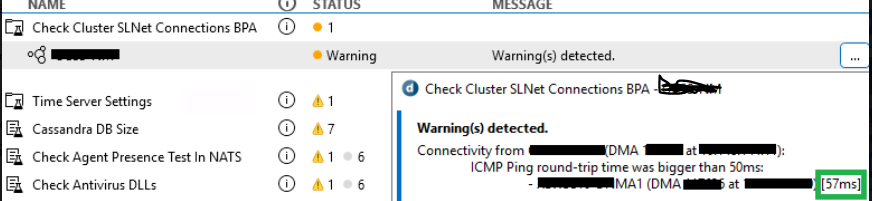
Additional info: 57ms is actually pretty good in terms of WAN link performance for these 2 endpoints - custom NATS topology was implemented in the cluster - and the host with 57ms is a leaf node in terms of NATs config, while the other belongs to the "Core".

Thanks

EDIT: adding DM version info --> DataMiner (10.5.0.0-15943-CU4)

Alberto De Luca [DevOps Enabler] Selected answer as best 14th December 2025

1 Answer

  • Active
  • Voted
  • Newest
  • Oldest
1
Paulo Henriques [SLC] [DevOps Advocate]1.05K Posted 11th November 2025 2 Comments

Hello Alberto,

In the current implementation of the “Check Cluster SLNet Connections” BPA, the maximum round-trip time is defined as a constant with a fixed value of 50 ms, and therefore cannot be changed.

We will evaluate whether this limit can be made configurable in a future version of the BPA.

Until then, I’m afraid you will need to ignore the warning message being generated.

Cheers,
Paulo

Paulo Henriques [SLC] [DevOps Advocate] Posted new comment 15th December 2025
Alberto De Luca [DevOps Enabler] commented 13th December 2025

Thanks for your feedback Paulo – feature suggestion added:
https://community.dataminer.services/new-feature-suggestions/configure-or-increase-the-round-trip-time-in-check-cluster-slnet-connections-bpa/

Ad interim, is the rule available on the DMA to tweak that value to 80ms for example?

That would give us a better perception of unexpected delays in our environment.

Paulo Henriques [SLC] [DevOps Advocate] commented 15th December 2025

Hi Alberto,

Thanks for adding the feature request, you already have my vote 🙂

The 50ms is hardcoded as a constant inside the DLL which makes it very difficult to override. The only way would be to manipulate the binary dll directly, which we definitely shouldn’t do.

To give you a more precise idea, below is a snippet from the existing code:

const int MAX_ROUNDTRIP_TIME_MS = 50;
…
CheckPingReplies(agentResult, MAX_ROUNDTRIP_TIME_MS);
…

You are viewing 1 out of 1 answers, click here to view all answers.
Please login to be able to comment or post an answer.

My DevOps rank

DevOps Members get more insights on their profile page.

My user earnings

0 Dojo credits

Spend your credits in our swag shop.

0 Reputation points

Boost your reputation, climb the leaderboard.

Promo banner DataMiner DevOps Professiona Program
DataMiner Integration Studio (DIS)
Empower Katas
Privacy Policy • Terms & Conditions • Contact

© 2026 Skyline Communications. All rights reserved.

DOJO Q&A widget

Can't find what you need?

? Explore the Q&A DataMiner Docs

[ Placeholder content for popup link ] WordPress Download Manager - Best Download Management Plugin