
Skip to content
DataMiner Dojo

More results...

Generic selectors
Exact matches only
Search in title
Search in content
Post Type Selectors
Search in posts
Search in pages
Search in posts
Search in pages
Log in
Menu
  • Updates & Insights
  • Questions
  • Learning
    • E-learning Courses
    • Tutorials
    • Open Classroom Training
    • Certification
      • DataMiner Fundamentals
      • DataMiner Configurator
      • DataMiner Automation
      • Scripts & Connectors Developer: HTTP Basics
      • Scripts & Connectors Developer: SNMP Basics
      • Visual Overview – Level 1
      • Verify a certificate
    • YouTube Videos
    • Solutions & Use Cases
      • Solutions
      • Use Case Library
    • Agility
      • Learn more about Agile
        • Agile Webspace
        • Everything Agile
          • The Agile Manifesto
          • Best Practices
          • Retro Recipes
        • Methodologies
          • The Scrum Framework
          • Kanban
          • Extreme Programming
        • Roles
          • The Product Owner
          • The Agile Coach
          • The Quality & UX Coach (QX)
      • Book your Agile Fundamentals training
      • Book your Kanban workshop
    • >> Go to DataMiner Docs
  • DevOps
    • About the DevOps Program
    • Sign up for the DevOps Program
    • DataMiner DevOps Support
    • Feature Suggestions
  • Downloads
  • Swag Shop
  • PARTNERS
    • Business Partners
    • Technology Partners
  • Contact
    • Sales, Training & Certification
    • DataMiner Support
    • Global Feedback Survey
  • >> Go to dataminer.services

Appear X20 – SRT Output redundancy group

Solved195 views3rd August 2026AppearTV X20 Platform SRT Output redundancy
3
Daniel Lentoiu94 31st July 2026 0 Comments

Hi all,

The Appear X20 driver supports SRT Outputs and SRT Status tables.
If I understood correctly the SRT Output Service Table likely shows the configured source (Input Key / Source), not necessarily the currently active source after a redundancy switchover.

Does the Appear X20 API expose the active source used by an SRT Output redundancy group, and if so, which DataMiner parameter/table contains this information? If not exposed, is there a planned enhancement to add SRT Output redundancy status similar to the IP Switch Output Input Redundancy tables?

Thanks,

Daniel Lentoiu Selected answer as best 3rd August 2026

1 Answer

  • Active
  • Voted
  • Newest
  • Oldest
2
Robin Meurisse [SLC] [DevOps Advocate]1.51K Posted 31st July 2026 1 Comment

Hi Daniel,
The Appear API allows retrieving extra status data for IP and SRT Outputs, including the redundancy settings and which source is currently active in the outgoing TS.
The 1.2.4.x range recently added support for showing the Redundancy Settings for SRT Outputs, similar to what already exists for IP Switch Outputs and Dual IP Outputs.
The AppearTV X20 connector currently has two active ranges:
- 1.2.4.x – non-Unicode connector
- 2.0.3.x – fully Unicode-supported connector
The intention is for both ranges to remain functionally equal, aside from Unicode support.
It's planned to bring the 2.0.3.x range in line with 1.2.4.x, which will include the added Redundancy Settings and active source info for SRT. This has not happened yet, though. Feel free to reach out to your Skyline contact if this would be a priority for you.
---
Next to the above, it's also worth considering the successor to the AppearTV X20 Platform connector: Appear X Platform. It offers a more extensive list of supported modules, higher firmware/API support, and additional status tables, among other improvements. If possible, it might be worth migrating your elements to this newer connector.
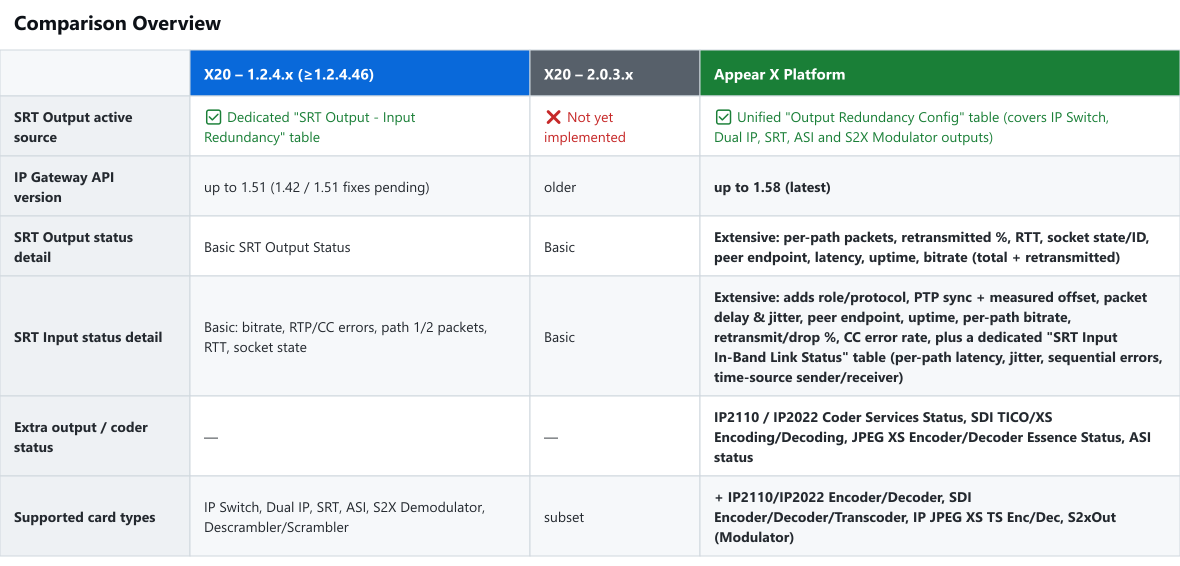
Let us know if you have any questions!

Daniel Lentoiu Posted new comment 3rd August 2026
Daniel Lentoiu commented 3rd August 2026

Thanks Robin.
After testing we found that Appear X Platform driver has more data available and it is more suitable to be used by Operations.

Please login to be able to comment or post an answer.

My DevOps rank

DevOps Members get more insights on their profile page.

My user earnings

0 Dojo credits

Spend your credits in our swag shop.

0 Reputation points

Boost your reputation, climb the leaderboard.

Promo banner DataMiner DevOps Professiona Program
DataMiner Integration Studio (DIS)
Empower Katas
Privacy Policy • Terms & Conditions • Contact

© 2026 Skyline Communications. All rights reserved.

DOJO Q&A widget

Can't find what you need?

? Explore the Q&A DataMiner Docs

[ Placeholder content for popup link ] WordPress Download Manager - Best Download Management Plugin