

a {
text-decoration: none;
color: #464feb;
}
tr th, tr td {
border: 1px solid #e6e6e6;
}
tr th {
background-color: #f5f5f5;
}
I had set a “hysteresis on” at value:"1202" after 50.000 seconds, and this only for “minor Hi” and an alarm if value:"1201" is warning hi as usual. In the element, you can see that it turns blue for H14xx1, but when I check the alarm, I don’t see it. It only appears after the hysteresis has disappeared.
As shown below:
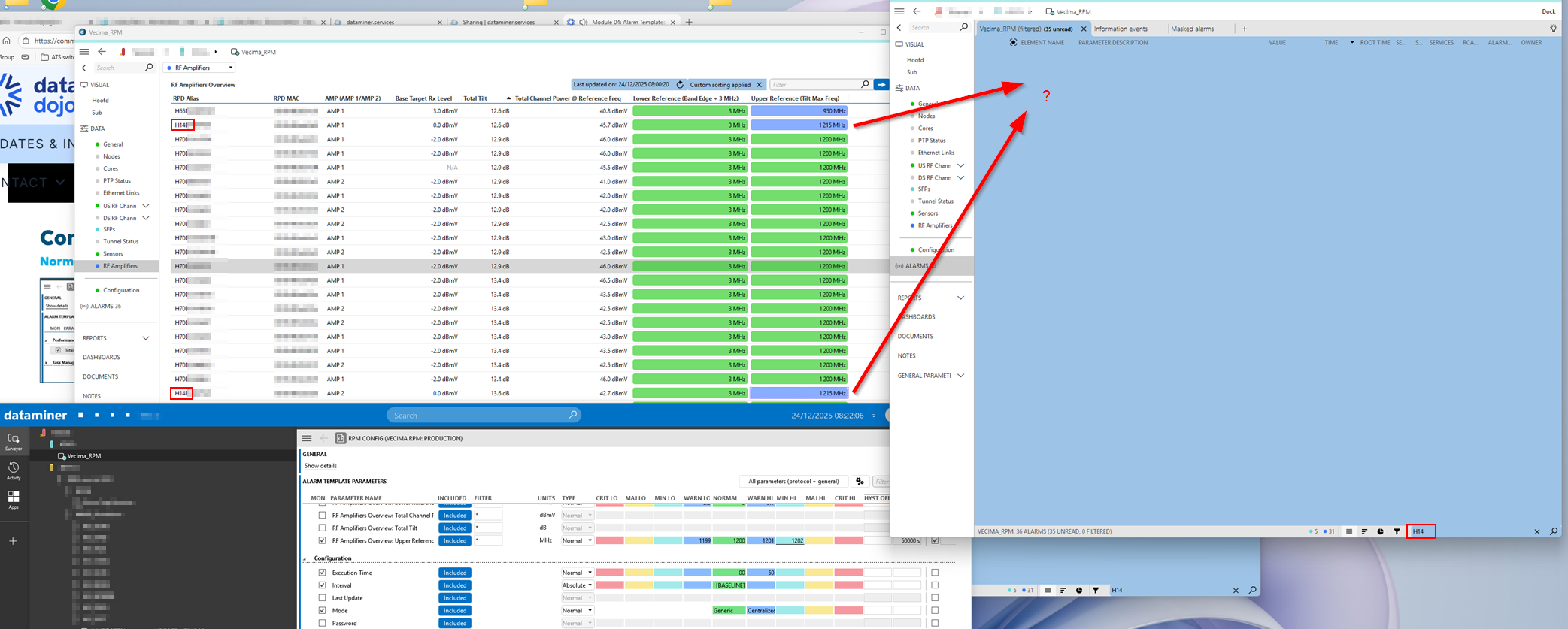 I actually wanted to create an alarm that starts as just a warning and then, after 50,000 seconds, should update to a minor—without generating a new alarm. And that’s when I noticed this behavior.
That filter doesn’t matter here; I’ve added information template to these alarms.
I set an alarm on “1201” as a warning and set the value “1202” as minor with a hysteresis of 50,000 seconds. The value in my problem is “1215”. When I activate this, I would expect the alarm to be blue (Warning) for the first 50,000 seconds and then turn blue-green (Minor) after 50,000 seconds.
But what actually happens is that only after 50,000 seconds the alarm turns blue-green (Minor). You don’t see anything of the warning.
What I actually want is to create an alarm on a certain value with severity “Warning,” and if this value persists longer than 50000 seconden, I want to change it to “Minor” without creating a new alarm.
Thanks in advance.