

a {
text-decoration: none;
color: #464feb;
}
tr th, tr td {
border: 1px solid #e6e6e6;
}
tr th {
background-color: #f5f5f5;
}
I had set a “hysteresis on” at value:"1202" after 50.000 seconds, and this only for “minor Hi” and an alarm if value:"1201" is warning hi as usual. In the element, you can see that it turns blue for H14xx1, but when I check the alarm, I don’t see it. It only appears after the hysteresis has disappeared.
As shown below:
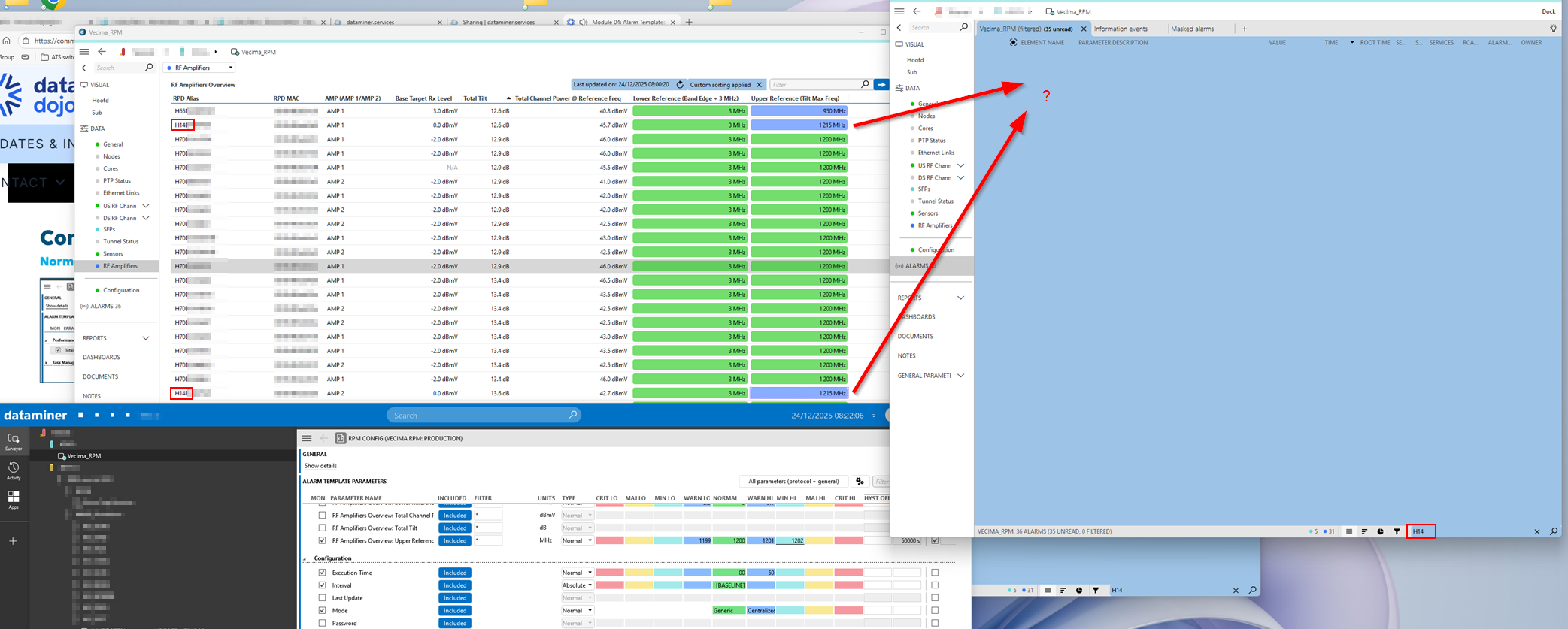 I actually wanted to create an alarm that starts as just a warning and then, after 50,000 seconds, should update to a minor—without generating a new alarm. And that’s when I noticed this behavior.
That filter doesn’t matter here; I’ve added information template to these alarms.
I set an alarm on “1201” as a warning and set the value “1202” as minor with a hysteresis of 50,000 seconds. The value in my problem is “1215”. When I activate this, I would expect the alarm to be blue (Warning) for the first 50,000 seconds and then turn blue-green (Minor) after 50,000 seconds.
But what actually happens is that only after 50,000 seconds the alarm turns blue-green (Minor). You don’t see anything of the warning.
What I actually want is to create an alarm on a certain value with severity “Warning,” and if this value persists longer than 50000 seconden, I want to change it to “Minor” without creating a new alarm.
Thanks in advance.

Hello Tim,
By the name of the element that you are using, I am assuming it is using the connector Vecima RPM.
While checking this driver, I can see that the RPD Alias is not used as a Display Key of that table, which means that the filter you are using should not be useful for what you are looking for.
Can you please share and confirm what are the values that show up on the alarm console for the active alarms on that table without using the filter?
Besides, can you please further explain on what do you mean with this:
"(...) but when I check the alarm, I don’t see it. It only appears after the hysteresis has disappeared."
Can you see the alarm showing up after the 50s?
Thanks in advance for your input!

Hi Tim,
I believe I see your point here.
So if your parameter goes 'slowly' up, meaning it goes from 1200 to 1201 to 1202, then it will be in warning for 50000sec and then in minor, but if it jumps from 1200 to 1202 in one go, then it will stay in normal for 50000sec and then in minor.
I can understand that this is 'unexpected' behavior, but I can experience the same on my DMS.