

Dear DoJo,
In a correlation rule sending an email I try to add the alarm description as defined in an information template. Since I cannot find any placeholder for this to use I wonder if there is another way to put that information in the email message.
Thanks in advance
Michael

Hi Michael,
First of all, apologies for starting a new answer. I couldn’t share screenshots in the comments.
I’m afraid you’re correct: the alarm description isn’t available either as a placeholder or within the alarm info data.

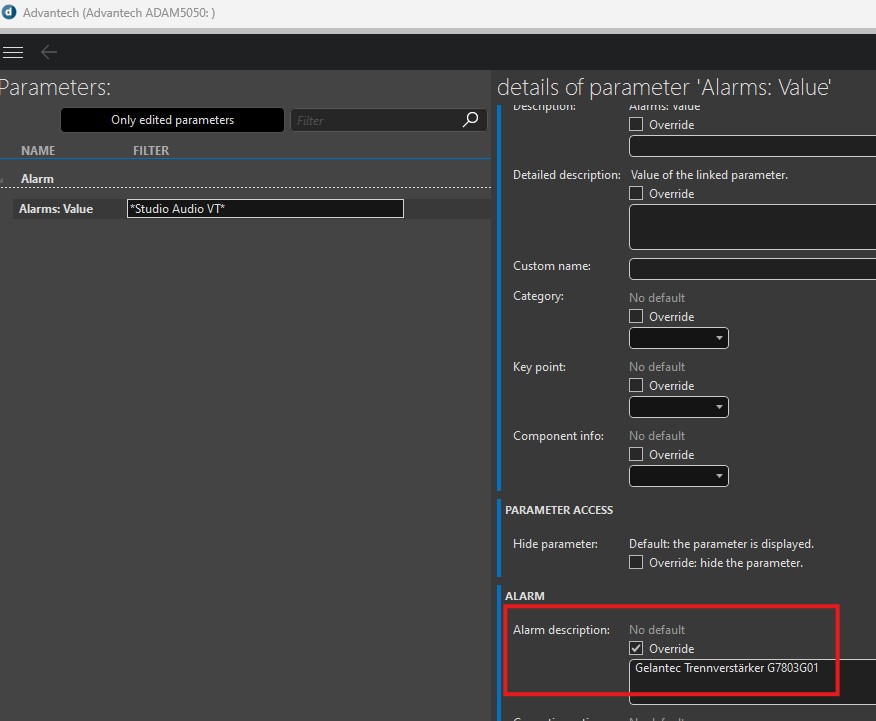
Alarm Info details:


Hi Luis,
I'm afraid this is not exactly what I'm looking for. I've added for some parameters an alarm description in an information template. That is what I want to add in the email. But there is no placeholder for that. I think that is not even in the correlated alarm info include as described by Felix.
Hi Michael,
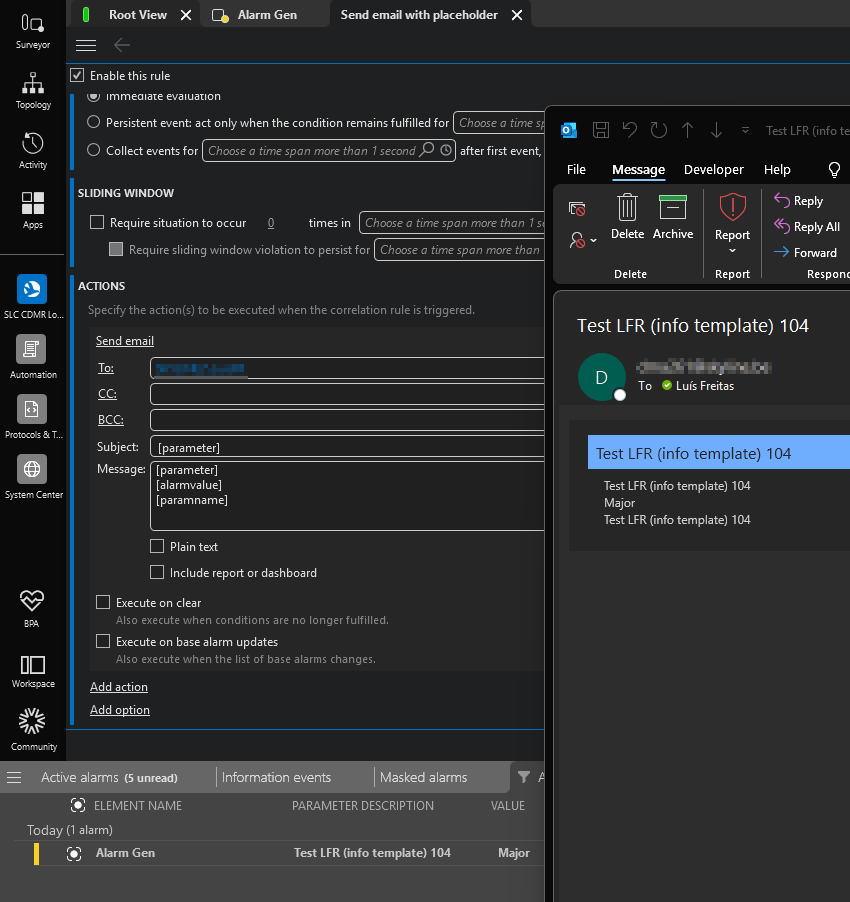
You can achieve that by using placeholders in both the subject and message fields of a correlation rule's email action.
This is described here (see point 4 → Note): Sending an email | DataMiner Docs
And as you can see in the example below:
I hope this helps!
Kind regards,
Luís Freitas

Hi Michael,
a possible solution is passing the correlation content to the automation engine by running a script as action in the correlation and send the mail from the script.
A special parameter (pipe separated) exists for the correlation param.
e.g.:
<Correlation Alarm Info>
65006
A pipe-separated string containing information about the alarm that triggered the correlation rule (only if the script was executed via a correlation rule):
0:alarmId|1:agentId|2:elementId|3:parameterId|4:parameterIdx|5:rootAlarmId|6:previousAlarmId|7:severity|8:type|9:status|10:alarmvalue|11:alarmTime|12:serviceRca|13:elementRca|14:parameterRca|15:severityRange|16:sourceId|17:userStatus|18:owner|19:impactedServices|20:propertyCount|propcount*2|scriptNamevt0:alarmId|1:agentId|2:elementId|3:parameterId|4:parameterIdx|5:rootAlarmId|6:previousAlarmId|7:severity|8:type|9:status|10:alarmvalue|11:alarmTime|12:serviceRca|13:elementRca|14:parameterRca|15:severityRange|16:sourceId|17:userStatus|18:owner|19:impactedServices|20:propertyCount|propcount*2|scriptName
For an example of how to parse the information in this string, see How do I parse Correlation Alarm Info data?
Here is a documentation of these parameters:
Special parameters available in automation scripts | DataMiner Docs
Running an automation script from a correlation rule | DataMiner Docs
Hi Felix,
Thanks very much for your response! I was afraid that this will come but it seems to be the only solution.
Thanks again
Best regards
Michael
Hi Luis,
Thank you for the confirmation. It's a pity but I suppose will have to adapt the parameter description then.