

Hello Dojo Community,
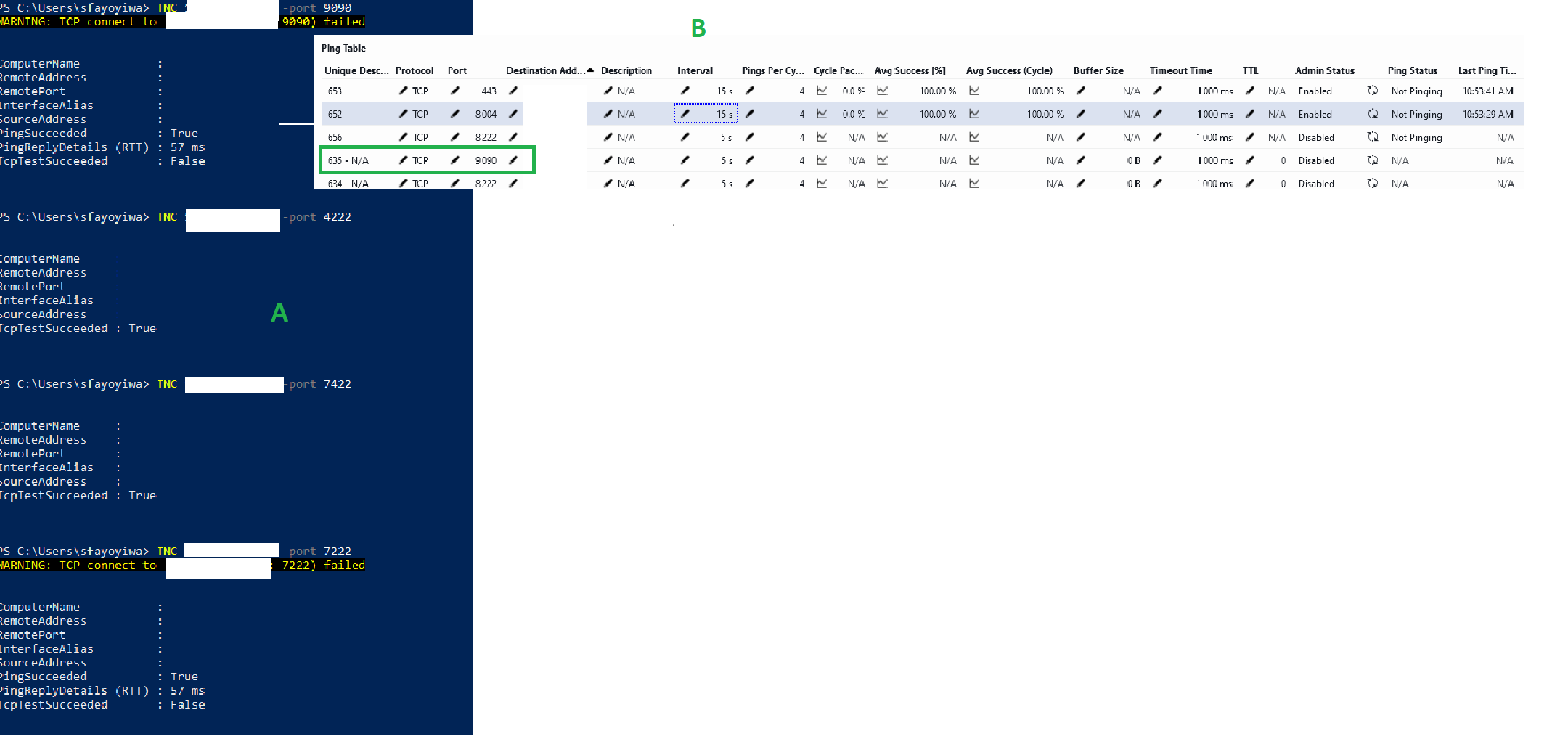
As part of a large-scale DataMiner transformation programme, we are validating connectivity between multiple critical endpoints using PowerShell Test-NetConnection, ping and traceroute. Some ports are reachable (e.g., 4222/6222) while others fail (e.g., 9090/8222 depending on endpoint). Rather than maintaining manual checks, I would like to operationalise this validation within DataMiner and continuously monitor:
- IP reachability
- TCP port reachability
- Traceroute/path changes
- Latency
- NATS client/cluster/monitoring ports
Has anyone implemented a scalable approach using the Ping protocol to embed the TCP test result on the specific port to alarm on connectivity degradation? Any examples or best practices would be greatly appreciated.

Hi Samson,
I think the Generic Network Services Monitor could be a good fit for this use case. This connector can monitor a wide range of services and protocols, including Ping, FTP, SMTP, DNS, HTTP, Web Services, Databases, TCP, RTSP, RTMP, TFTP, SFTP, NTP, and Network Shares.
Feel free to give it a try:
Generic Network Services Monitor | Catalog | dataminer.services
Hi Juan,
Thank you for the recommendation regarding the Generic Network Services Monitor. We will certainly evaluate that option in future, but not at the moment.
Before moving away from the existing Generic Ping implementation, we'd like to better understand the intended behaviour of the TCP monitoring functionality already available within the protocol.
Our current observation is that:
1) TCP ports can be configured within the Generic Ping element.
2) The TCP connectivity tests appear to execute.
However, we have not been able to identify any parameter, status field, alarm, or exposed result that presents the outcome of the TCP connection attempt to the operator.
From an operational perspective, this creates a challenge because the protocol appears capable of performing the test, yet the test result is not surfaced in a consumable way within DataMiner.
For our transformation programme, we need to continuously validate critical endpoints and services,
The objective is not only to configure these tests, but also to:
A) Track pass/fail status
B) Generate alarms
C) Trend availability
D) Display results in tables and/or dashboards
Therefore, could you please clarify:
– Is the Generic Ping protocol expected to expose the outcome of configured TCP port checks?
If so, which parameters should be used to retrieve or visualize the results?
If not, is this a known limitation of the protocol?
– Are there any plans to enhance the protocol so that TCP test results become first-class monitored metrics in the same way ICMP results are today?
Our preference would be to leverage and extend the existing Generic Ping capability rather than deploy an additional connector, particularly as we have already invested time building monitoring and operational processes around the current implementation.
Any guidance on whether this is intended functionality, a configuration issue, or an enhancement opportunity would be greatly appreciated.
Thanks in advance.