

I have a Transmission box that shows values such as Forward Power, Reflected Power, Radiated Power, etc. There are two overlapping versions of this box, one for Transmitter A1 and one for Transmitter B. The visible box is controlled by the active transmitter using a Show condition.
For example:
<code>Show:
<A>-A|[cardvar:ElementNameRS2]|383:Transmitter A1|=Enabled</code>
and for B:
<code>Show:
<A>-A|[cardvar:ElementNameRS2]|383:Transmitter B|=Enabled</code>
The value mapping is working correctly. For example, Forward Power uses:
<code>Parameter:
502:Transmitter A1|ALARM</code>
The value shown in the visual matches the actual value in Cube.
The issue is with the colour. I want the Forward Power row/box to show the alarm severity colour of that specific parameter, not the overall element colour.
For example, 502:Transmitter A1 is currently Normal in Cube, but the Forward Power row in the visual is still not showing the expected parameter alarm colour.
The parent/group also has:
<code>Element:
[cardvar:ElementNameRS2]</code>
If I remove the Element field from the parent, the inner parameter values become blank. If I add the Element field back, the values appear again, but the colour seems to follow the element instead of the individual parameter.
I also tried adding the Element directly to the child parameter shape and using AllowInheritance=False, but I am still not getting the full row coloured based on the parameter severity.
Could you please suggest the correct way to configure the condition to show the severity color on the box.
Currently - it is taking element severity. which is not our expectation.

Hi Jain,
Can you upload again your screenshots?
I created a small mockup to simulate your use case, and I am able to visualize the alarm from the parameter:
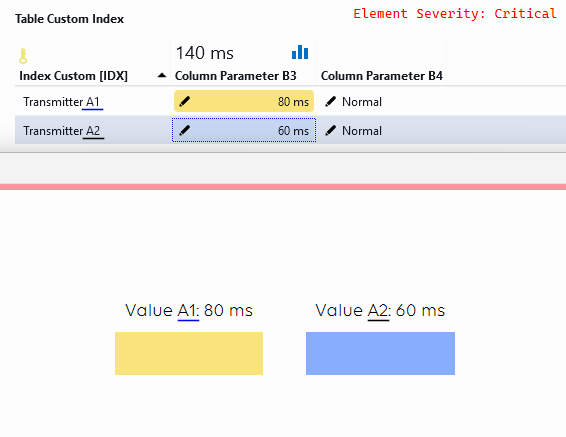
Block A1:
Parameter: 2003:Transmitter A1|ALARM
Show: <A>-A|TEST_ELEMENT_03|2004:Transmitter A1|=Normal
Text for block A1:
Paramater: 2003:Transmitter A1
Show: <A>-A|TEST_ELEMENT_03|2004:Transmitter A1|=Normal
Block A2:
Parameter: 2003:Transmitter A2|ALARM
Show: <A>-A|TEST_ELEMENT_03|2004:Transmitter A2|=Normal
Text for block A2:
Paramater: 2003:Transmitter A2
Show: <A>-A|TEST_ELEMENT_03|2004:Transmitter A2|=Normal
Group shape:
Element: TEST_ELEMENT_03
Below a small animation that shows how the shapes are shown/hidden based on the values of another column parameter:
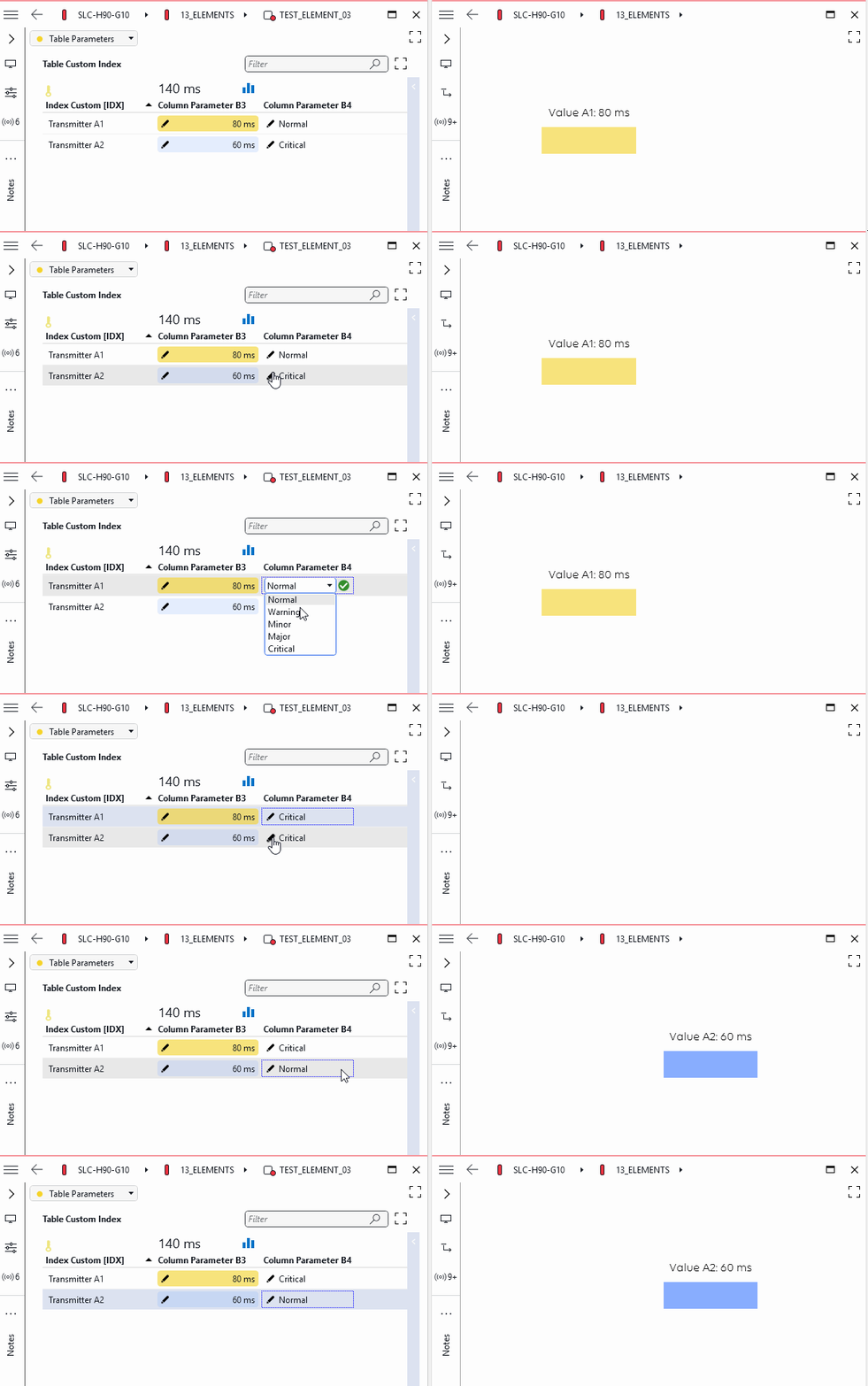
Hope it helps.