

Hi peeps, Though I'm aware that this (un)specific error was asked about in some other questions already, none of them provided us a solution that narrowed down the root cause why taking a backup fails on our DMA. Maybe someone has a hint for us.
Similar to others we can back up the DMA on a Local Path but not in a network path. Strangely enough we have another DMA available (in which saving a backup in a network path) from where I copied the network path, username and pw, though it shows us this already known error:

Checking the various Logs with mentionings if the error at that time:
1. C:\Skyline DataMiner\Backup\Backup.log.txt
2026-05-22 09:49:01|1 errors occurred during backup
2026-05-22 09:49:01|- Creating file remotely failed: Error: Unknown, 1326
2. C:\Skyline DataMiner\Logging\SLNet\FacadeHandleMessage0.txt
2026-05-22 09:49:01.567|20|Facade.HandleMessage|Incoming (Local SLNet): Alarm: 69503/2100000000/2259308/2259392 (!! Backup-process failed, see logging for details. Unbekannter Fehler (-2147467259)) - WIN-1F...KV/Backup status at 05/22/2026 09:49:01
2026-05-22 09:49:01.568|20|Facade.HandleMessage|Incoming (Local SLNet): Alarm: 69503/2100000000/2259308/2259393 (Backup job finished with errors) - WIN-1F...KV/Backup status at 05/22/2026 09:49:01 [cleared]
2026-05-22 09:49:01.568|20|Facade.HandleMessage|Incoming (Local SLNet): Alarm: 69503/2100000000/2259394/2259394 (Backup job had errors. !! Backup-process failed, see logging for details. Unbekannter Fehler (-2147467259)) - WIN-1F...KV/Backup status at 05/22/2026 09:49:01
SLDMS.txt / SLErrors.txt did not mention this error in any way. BTW Predefined Backup Type is "Full Backup without Database".
Any way we can narrow it down?
Thanks in advance!
Hi Gregor,
The issue here seems to be related with accessing the network path. In the SLBackup logs you saw the following lines.
2026-05-22 09:49:01|1 errors occurred during backup
2026-05-22 09:49:01|- Creating file remotely failed: Error: Unknown, 1326
The last one tells us that the backup fails when trying to copy over the backup to the network path. The error code shown here is 1326 (unfortunately our the human-friendly translation failed here, which is something we have to fix).
To figure out why it failed, the error 1326 will tell us. As this is an error code thrown by a windows function, and there can be found on the Microsoft docs. Error 1326 specifically means
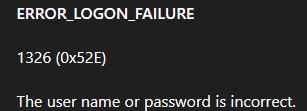
It seems the credentials are incorrect, or there is some other problem with the account preventing it to access the shares (permissions, lockout, expired credentials,....).
Hope this helped a bit to further the investigation.
Hi Gregor,
Glad to hear backups are working again after manually entering the password. Should you run in the issue again where the account credentials are saved incorrectly, feel free to reach out to Techsupport for deeper analysis.
Hi Brent, this was confusing at first because Copy&Pasting the correct PW in Cube, when configuring the Backup Path, apparently inserted a wrong PW. Typing it in manually helped and we were able to take Backups again. 🙂