

Hello everyone,
I have a Connector where I need to dynamically set the Parameter Description of a number of Parameters. Basically the Parameter Descriptions need to include the Site Name.
I am doint this using a QAction and SetParameterDescription. This works fine on newly created Elements, but now I have updated the Connector and added some Parameters. I expected to be able to change the Parameter Description of the new Parameters the same way, but nothing happens.
I tried:
- Setting the Parameter Description in the QAction
- Changing it directly in the Description.xml File
- Restarted Cube and the Element multiple times
- Restarted the entire DMA
Nothing helps, the new Parameters simply refuse to be renamed. What am I missing to be able to rename Parameters in these "older" Elements?
Best Regards,
Robert

Hi Robert,
Here is the suggestion I was referring to:
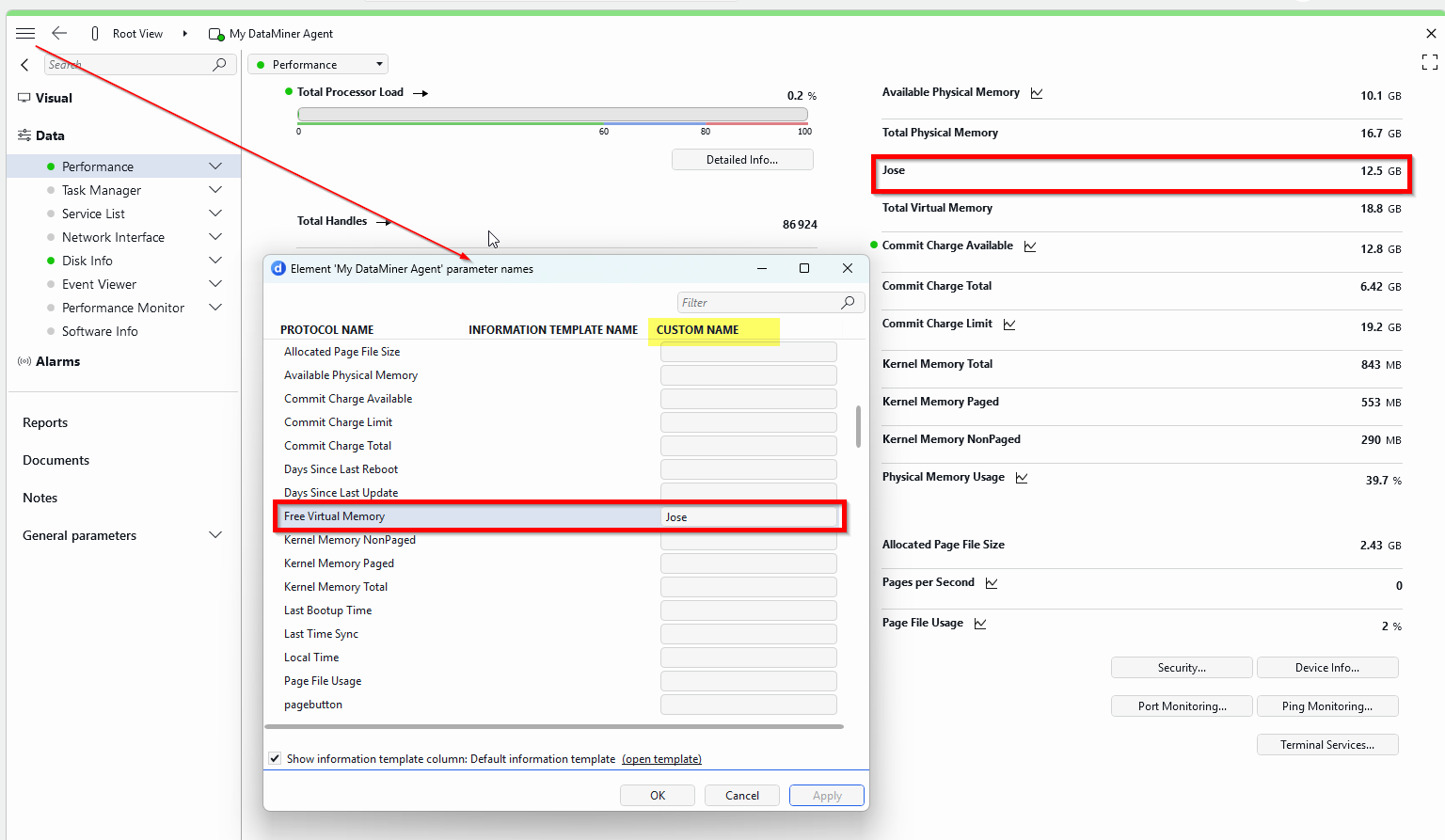

Hi Robert,
I never renamed a parameter description in a QAction myself, but there are some important things you need to make sure of.
- It is not possible to create two parameters with the same name, or two parameters with a very similar name where the only difference is the use of brackets in one of the parameter names.
- The following characters are not allowed in parameter names:
>,<,&,%.
Also, if the goal is to use custom parameter names for all elements of a particular protocol, it is generally better to use Information Templates instead of changing the protocol itself:
Using templates is usually the safer approach long-term, because if you later upgrade the connector to a newer catalog version, you would otherwise need to redo those protocol changes manually again.
kind regards,
Hello José,
it is not the parameter name.
Basically they are like this:
SITE Temperature
SITE Humidity
etc.
Where SITE will be replaced by a unique 3 letter abbreviation of the City name of the site.
In the QAction I have a Dictionary with the Parameter IDs and Descriptions.
When the Parameter holding the Sitename changes the QAction is called and I iterate over the Dictionary replacing SITE with the Sitename and setting it.
It works fine with a newly created Element. It runs without error with the old Element, but nothing happens. As I said, I even tried to manually put it in the xml File, also tried copying the xml File from the new Element. It just gets completly ignored…
It is a custom Connector. So any updates will be done by me anyway. In essence a highly configurable SNMP Connector for some Air Conditioning Units where they somehow managed SNMP so that the OIDs are different for every Device…
Because of this the Site Name and the OIDs are all configurable and we can work with one Connector instead of having one for each Site. Worked without issues for more than a year now. The issue with the renaming of the new Parameters is the first issue we had with it.
Best Regards,
Robert
Hi Robert,
I understand that you want to change the parameter description names, and actually my earlier suggestion was aimed in that direction as well. I’ll post a separate “New Answer” to better illustrate what I mean, since comments do not allow adding images.
Regarding your specific issue, it is quite strange that it works for newly created elements but not for the older ones.
Are you sure both elements are running exactly the same connector version? One possibility is that the older elements are still using a version marked as Production, while the newer element was created using a more recent protocol version that has not yet been promoted to Production (?).
That could explain why:
Newly created elements behave correctly.
Existing elements keep the old behavior even after restarts and updates.
It might be worth verifying the exact protocol version loaded by both the old and new elements.
Best regards,
Hello José,
that was the solution. It worked using this.
The Protocol versions are the same (both Production).
Anyway, it is solved now.
Thank you!
Best Regards,
Robert