
The DataMiner documentation is continuously growing and improving. That’s why from time to time we like to provide you with a summary of all things new in the DataMiner Docs.
Here’s a quick overview of the changes we’ve added to the documentation for DataMiner 10.6.2:
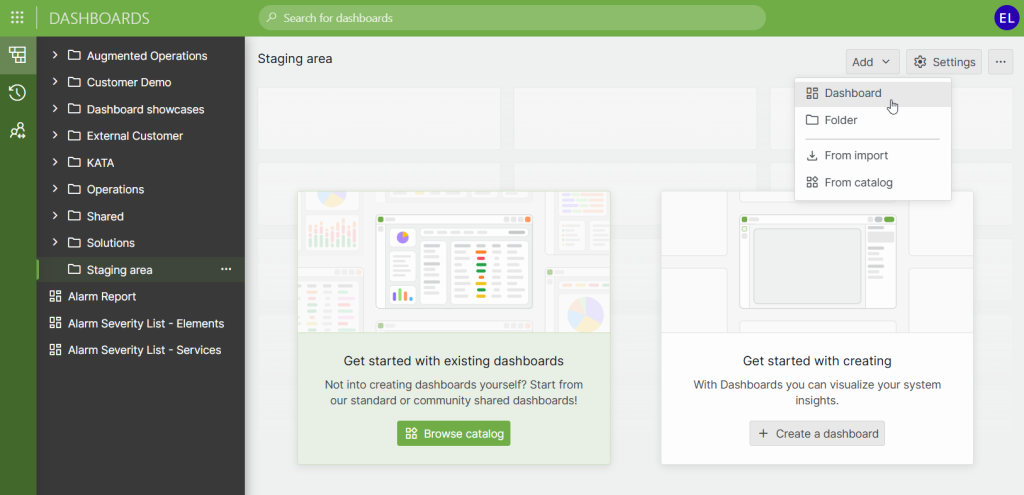
- The Dashboards app now supports keyboard navigation in the sidebar. You can use the TAB key to move through dashboards and folders and press Enter to open the selected item.
- Creating dashboards and folders has become more straightforward thanks to a new dropdown menu at the top of the home page and an updated right-click menu in the sidebar.
- When no dashboards or folders are selected in the Dashboards app, the home page now shows an overview of all available dashboards and folders as tiles, making it easier to browse your content.
- In Visual Overview, shapes can now be linked to video streams using VLC. When configured, the video is shown inline within the shape through the VLC media player.
- The Augmented Operations alarm settings in alarm templates now let you choose how flatlines are detected. With smart flatline alarming, SLAnalytics automatically identifies flatline periods that are considered anomalous.
- In Dashboards and Low-Code Apps, preset templates are now available for all template-supported components. Additionally, the redesigned Browse templates window makes it easier to find and apply the right template.
- The GQI DxM can now run on a Dashboard Gateway server, allowing GQI queries to execute in a dedicated extension module with improved performance and better load distribution.
- The node edge graph component in Dashboards and Low-Code Apps now offers more control over node and edge labels. You can hide labels, link them to the conditional coloring configuration, or display a custom field of your choice.
But those are not the only things we’ve changed recently!
- The dataminer.InfraOps solution is now fully documented, including its three applications, all ready to use out of the box.
- A new short video explains how to share a dashboard via email report from the Dashboards app.
- New diagrams illustrate IP communication within a DMS, helping you understand how internal communication should be set up.
- The Working with relational anomaly detection tutorial has been extended to cover the latest RAD functionalities.
- New documentation introduces the Document Intelligence feature, part of the DataMiner Assistant DxM, which allows you to analyze documents based on instructions you provide.
Noticed something that could be improved in the DataMiner documentation? Your feedback can make the difference! Submit an issue or propose your changes on GitHub! If you’re a DevOps Professional, you’ll also score some points in the process 😊
Previous DataMiner releases
BLOG
What’s new in the documentation for the 10.6.1 release?
Find out what’s been added to the documentation for DataMiner version 10.6.1.
BLOG
What’s new in the documentation for the 10.5.12 release?
Find out what’s been added to the documentation for DataMiner version 10.5.12.
Nice and quick update to get up to speed with the latest niceties! Thanks.