
With every DataMiner Feature Release, we introduce improvements and new capabilities that help you get more value out of your system. In this post, we highlight the most noteworthy additions to DataMiner 10.6.3.
Below, you’ll find a list of the new or improved features that are worth highlighting in this release. Each item links to relevant documentation where you can find more details.
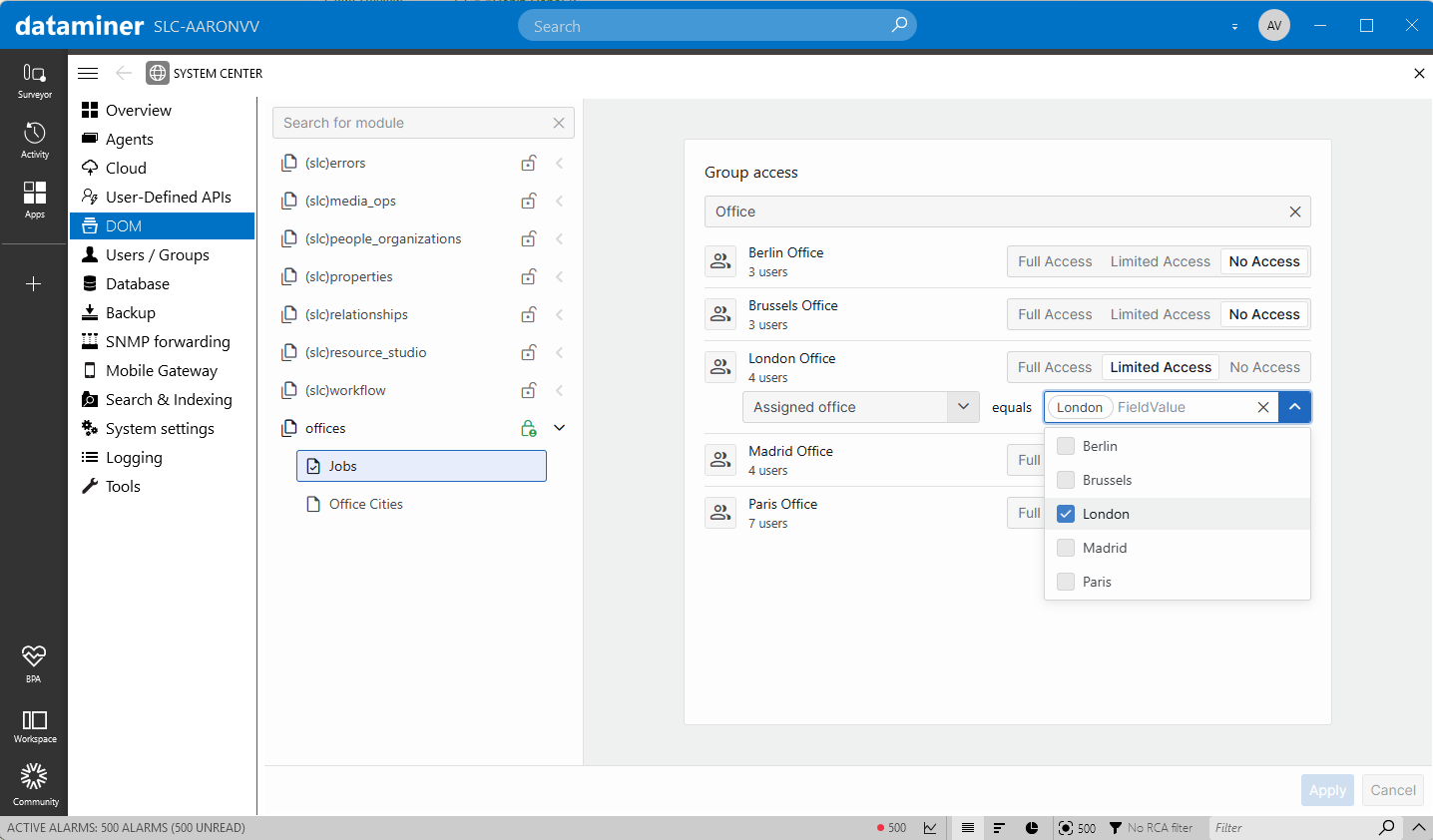
- With the updated DOM security UI, you can now configure access not only at the DOM definition level, but also per DOM instance. This makes it possible to restrict access to specific instances based on their field values. For example, access can be limited so that a user group only sees DOM instances related to a specific office or region.
- DataMiner now runs multiple SLScripting processes by default, aligned with the number of SLProtocol processes. If an SLScripting process disappears, any affected elements are automatically restarted, improving overall stability and consistency.
- Scheduled tasks can now be swarmed between Agents in a cluster when they are stored in a database. To make this possible, you can now migrate scheduled task storage from XML to a database.
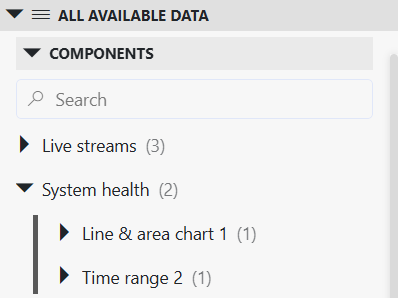
- In the Low-Code Apps module, component data is now consistently grouped under its page or panel name. Previously, the current page or panel’s data appeared at the top level, separate from the rest. Now, everything—including the current page—is neatly organized under its respective page or panel, making the structure more uniform and easier to navigate.
- The new IGQISession interface provides GQI extensions with access to user information for the current query session, enabling scenarios such as user-based security checks.
- From now on, you can make a low-code app use custom CSS code, overriding the default styling of the app.
- Visual Overview now supports linking shapes to inputs and outputs of table-based matrices.
- When a GQI query is created, the Get parameters for element where data source can now also query indexed logger tables stored in an Elasticsearch or OpenSearch database.
- Components in Dashboards and Low-Code Apps that support the Empty result message setting can now be left empty, so they stay blank instead of showing a placeholder message when no results are returned.
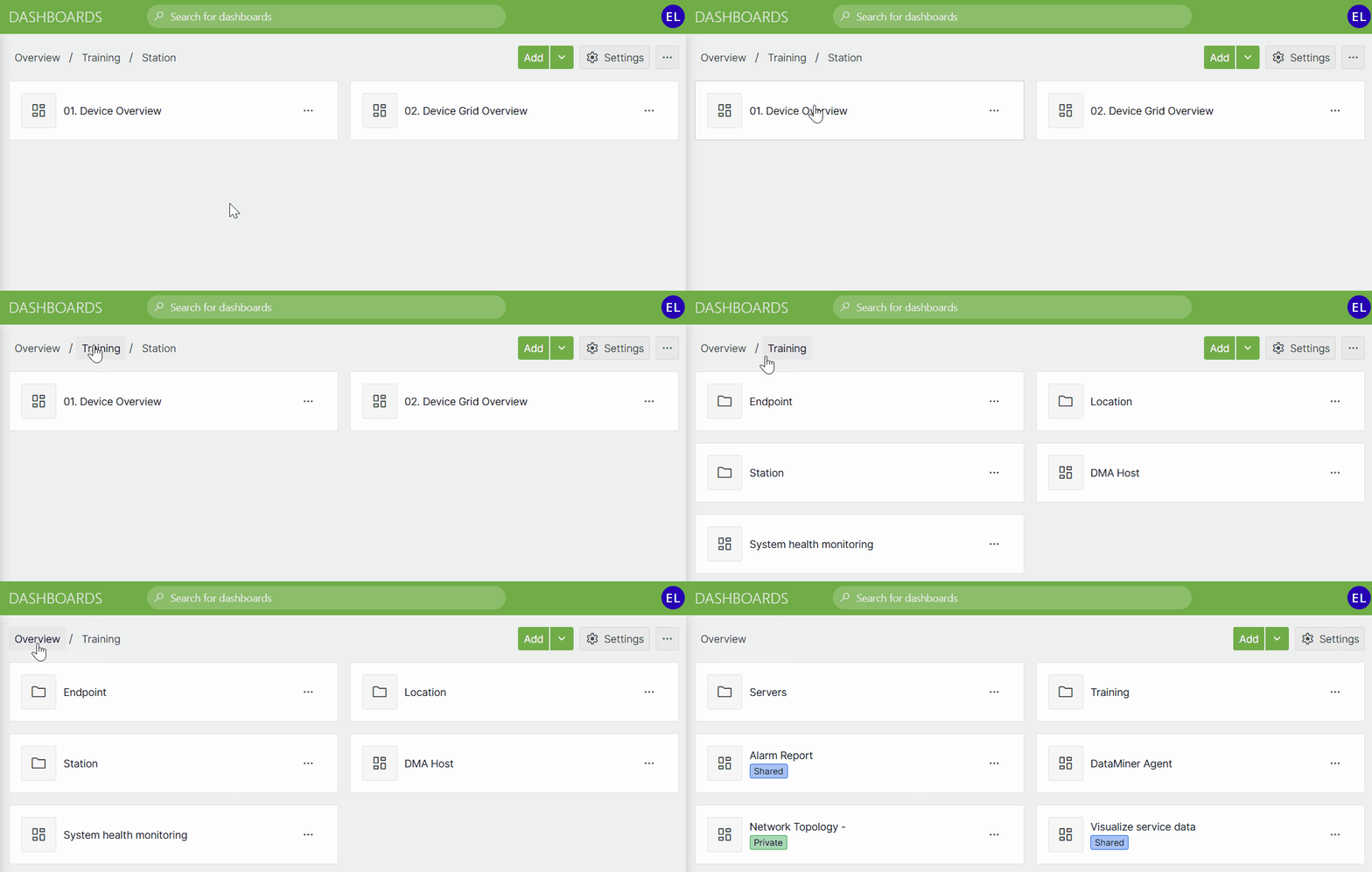
- When you select a folder in the Dashboards app, breadcrumbs are now displayed to make it easy to navigate back to the root view or quickly jump to any previous folder level with a single click.
- Several improvements have been made to the timeline component in Dashboards and Low-Code Apps:
- When you apply grouping to a timeline component, you now have full control over how each group takes up space. Choose a fixed height to keep every group visually consistent, no matter how many items it contains, or let it grow, allowing groups to expand naturally as more items are added—while keeping each item perfectly sized.
- You can now customize not only the appearance of timeline items, but also timeline groups, including styling group headers and adding icons to visually distinguish different groups.
- By rotating the mouse wheel while keeping the ALT key pressed, you can adjust the height of all items on a timeline at once.
Relational anomaly detection now available on the Main Release track
Relational anomaly detection (RAD) has been available since DataMiner 10.5.3 and is now also part of the Main Release track as of DataMiner 10.6.0. By monitoring how parameters behave together instead of in isolation, RAD can uncover issues that remain invisible to traditional threshold-based monitoring.

Content expert: Dennis Dreesen
For a complete list of changes added in DataMiner 10.6.3, including technical details and fixes, refer to the official release notes.
Previous DataMiner releases
BLOG
What’s new in the documentation for the 10.6.2 release?
Find out which new and improved features have been added in DataMiner version 10.6.2.
BLOG
What’s new in the documentation for the 10.6.1 release?
Find out which new and improved features have been added in DataMiner version 10.6.1.