

Hi All
I am using a filter box in a visio to filter a drop down list using the below syntax:
Filter:
SetVar | InputFilter[property:Channel]
Dropdown:
SetVar | [Sep::;]Input[property:Channel];;[regexreplace:(?i)(?<filter>[^;]*[var:InputFilter[property:Channel]][^;]+;?)|(?<alt>[^;]+;?),AmagiGB27;AmagiGB28,${filter}]
However when i put into the filter box for example 28, it doesnt populate, however if I put in a 2 it does, it doesnt seem to take into account the last character in the dropdown entry:
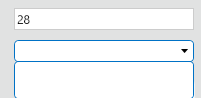
Does anyone know why this is? Or how to fix it?
Thanks
Ryan

It was a bit of a tricky regex to investigate, but this is what I landed on:
[Sep::;]Input[property:Channel];;[regexreplace:(?i)(?<filter>[^;]*[var:InputFilter[property:Channel]][^;]*;?)|(?<alt>[^;]+;?),AmagiGB33;AmagiGB27;AmagiGB28,${filter}]I added another Amagi for testing and I don't have the channel property, so I hard-coded it to 1 like below (in case the property would give issues, which I'm guessing it isn't)
[Sep::;]Input1;;[regexreplace:(?i)(?<filter>[^;]*[var:InputFilter1][^;]*;?)|(?<alt>[^;]+;?),AmagiGB33;AmagiGB27;AmagiGB28,${filter}]The reason is that since 28 is at the end of the string, the match was failing causing + to not match, so I used a * instead.
Let me know if this works or you still have issues!

Hi Blake,
That's exactly what I was looking for, strangely it wasn't just happening to the entry at the end of the string but all of them so i assume it was the same reason, but nevertheless that's worked.
Thanks