

Skip to content
DataMiner Dojo

More results...

Generic selectors
Exact matches only
Search in title
Search in content
Post Type Selectors
Search in posts
Search in pages
Search in posts
Search in pages
Log in
Menu
  • Updates & Insights
  • Questions
  • Learning
    • E-learning Courses
    • Tutorials
    • Open Classroom Training
    • Certification
      • DataMiner Fundamentals
      • DataMiner Configurator
      • DataMiner Automation
      • Scripts & Connectors Developer: HTTP Basics
      • Scripts & Connectors Developer: SNMP Basics
      • Visual Overview – Level 1
      • Verify a certificate
    • YouTube Videos
    • Solutions & Use Cases
      • Solutions
      • Use Case Library
    • Agility
      • Learn more about Agile
        • Agile Webspace
        • Everything Agile
          • The Agile Manifesto
          • Best Practices
          • Retro Recipes
        • Methodologies
          • The Scrum Framework
          • Kanban
          • Extreme Programming
        • Roles
          • The Product Owner
          • The Agile Coach
          • The Quality & UX Coach (QX)
      • Book your Agile Fundamentals training
      • Book you Kanban workshop
    • >> Go to DataMiner Docs
  • DevOps
    • About the DevOps Program
    • Sign up for the DevOps Program
    • DataMiner DevOps Support
    • Feature Suggestions
  • Downloads
  • Swag Shop
  • PARTNERS
    • Business Partners
    • Technology Partners
  • Contact
    • Sales, Training & Certification
    • DataMiner Support
    • Global Feedback Survey
  • >> Go to dataminer.services

Show/Hide Shapes based on each Alarm Severity for one particular Element

75 views1 day agoalarm Severity shape manipulation Visio
3
Gregor Gielok [DevOps Enabler]140 1 day ago 0 Comments

Hi community!

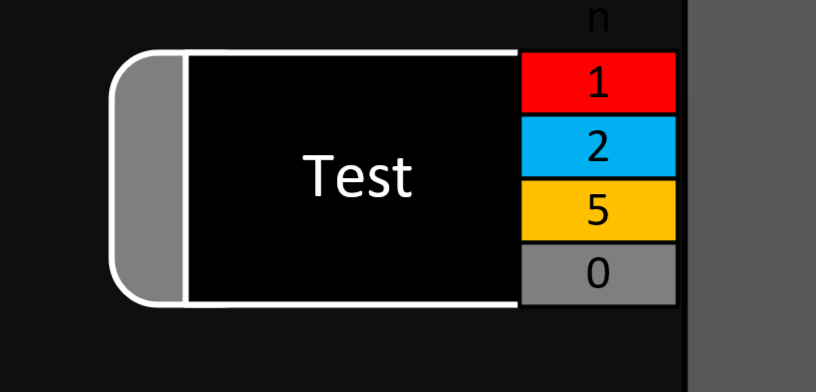
For the four colored squares, I have created an AlarmSummary shape data in the following style, as well es the respective Alarm Filters "Test_xxx":

active|Test_Critical|false|Alarm
active|Test_Major|false|Alarm
active|Test_Warning|false|Alarm
active|Test_Info|false|Alarm

This works for us as intended. Our next approach would be to only show the boxes if there is at least one alarm of each severity present on respective element. I have tried the following approach:

SHOW

<A>-A|Element:123456/2|ALARMLEVEL|=CRITICAL
<A>-A|Element:123456/2|ALARMLEVEL|=MAJOR
And so on..

..which does work as well but not if there are alarms of each severity present on an element, because only the highest severity would be respected and thus be considered as Condition = true.

Meaning: If the Element's Alarm Level is Critical, the boxes for lesser severities would not be shown.

Is there a suitable approach to do this or any workaround?

Gerwin van der Kamp [DevOps Advocate] Answered question 1 day ago

1 Answer

  • Active
  • Voted
  • Newest
  • Oldest
3
Gerwin van der Kamp [DevOps Advocate]3.77K Posted 1 day ago 2 Comments

did not test this but if the alarm summary produce an count, maybe you can do an if the alarm summary of an alarm is higher than 0 show instead of triggering on the alarm state itself?

it seems that it might be possible:

https://docs.dataminer.services/develop/devguide/Visio/miscellaneous/Extended_conditional_shape_manipulation_actions.html#using-statistics-in-the-condition

<A>-A|Element:123456/2|#CriticalAlarms|>0

Felix Wesemeier [DevOps Catalyst] Edited comment 13 hours ago
Gregor Gielok [DevOps Enabler] commented 1 day ago

Hi Gerwin,

this indeed did the trick, thank you! Using #CriticalAlarms, #MajorAlarms and #WarningAlarms worked so far. I'm still trying to make use of #NoticeAlarms which I presume to be relevant for Information Events. Do you have an idea if this is the intended way to use it? Not sure, because this one does not seem to work.

Felix Wesemeier [DevOps Catalyst] commented 1 day ago

Hi Gregor,
Severity Notice is not the same as Information.
Information Events just appear at a point of time, without having a different/clear state like „Normal“, so they are not countable this way.
https://docs.dataminer.services/dataminer/Troubleshooting/Troubleshooting_Flowcharts/Troubleshooting_Identify_Per_Module/Alarm_Console/Troubleshooting_Alarm_Console.html

Please login to be able to comment or post an answer.

My DevOps rank

DevOps Members get more insights on their profile page.

My user earnings

0 Dojo credits

Spend your credits in our swag shop.

0 Reputation points

Boost your reputation, climb the leaderboard.

Promo banner DataMiner DevOps Professiona Program
DataMiner Integration Studio (DIS)
Empower Katas
Privacy Policy • Terms & Conditions • Contact

© 2026 Skyline Communications. All rights reserved.

DOJO Q&A widget

Can't find what you need?

? Explore the Q&A DataMiner Docs

[ Placeholder content for popup link ] WordPress Download Manager - Best Download Management Plugin