

Hi Dojo,
I'm coping with scheduling task. I've found out, that I'm unable to create a task for tomorrow.
I have simple script:
DateTime timeFrom, timeTo;
var scheduler = new Scheduler(engine.GetUserConnection(), t => t.TaskName.StartsWith("TestSchedule"));
var scheduleOnce = new ScheduleOnce(createSchedulerEvent: false);
var paramsList = new List<AutomationScriptInputParameter>{};
timeFrom = DateTime.Now.AddDays(1).AddMinutes(2);
timeTo = timeFrom.AddMinutes(1);
engine.GenerateInformation($"As defined StartTime: {timeFrom} StopTime: {timeTo}");
var scriptActionStart = new AutomationScriptAction("Test", checkSets: false, runAsync: false, paramsList, Array.Empty<Skyline.DataMiner.Net.Messages.AutomationProtocolInfo>());
var taskStart = new Skyline.DataMiner.Core.Scheduler.Automation.SchedulerTask($"TestSchedule {timeFrom} - {timeTo}", $"Test schedled tast", timeFrom, timeTo, scheduleOnce, scriptActionStart);
engine.GenerateInformation($"In task StartTime: {taskStart.StartDateTime} StopTime: {taskStart.EndDateTime}");
scheduler.CreateOrUpdateSchedulerTask(taskStart);
I expected the schedule to run tomorrow, and the debug output in information events confirms the correct dates.

However, the scheduler task is actually created for today.
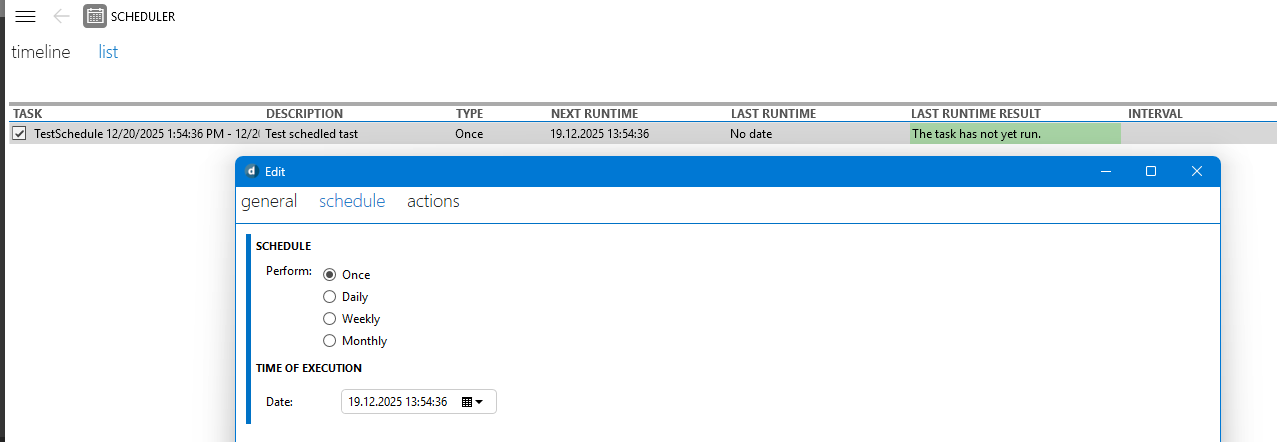
can you tell me what I am doing wrong?

Hi Jan,
you will need to set the TaskStartDate on the ScheduleOnce object after creation. I believe only the time of your startTime is taken into account when creating the SchedulerTask object. See following example
var startTime = DateTime.Today.AddDays(1);
var scheduleOnce = new ScheduleOnce();
scheduleOnce.TaskStartDate = startTime;
var taskToBeScheduled = new SchedulerTask("Placeholder", "placeHolder", startTime, DateTime.MaxValue, scheduleOnce);
Kind regards,
Hi Jan,
Apologies for the delay, The documentation that i used to learn more about this class can be found here: https://docs.dataminer.services/develop/devguide/ClassLibrary/ClassLibraryScheduler.html?q=ScheduleOnce#creating-the-scheduled-task
Otherwise I don't believe any documentation exists that explicitly states this behavior.
Kind regards,
Thank you very much. Now it works fine.
Could I ask, is this somewhere documented?