After installing MediaOps 1.5.1 and DataMiner 10.6.3, the theme of my applications changed automatically to "Skyline Light - Gray". Previously, the applications were using themes like "Resource Scheduling".
The "Resource Scheduling" theme is still available in the Layout → Theme list in the page editor.
However, I noticed something different in the page JSON configuration:
Before the upgrade, the pages contained:
"ThemeKey": "Resource Scheduling"
After reselecting the theme from the editor, the JSON now contains a GUID instead:
"ThemeKey": "50513329-f2ae-8e5b-a34c-dd2689cada24"
Has anyone experienced this behavior after upgrading?
Do I need to reapply the theme on all pages, or is there a way to retrieve the IDs of the themes so they can be set correctly in the JSON?
Thanks Michiel, restarting IIS did not solve the issue. I had a session this afternoon with two Skyline engineers regarding this issue.
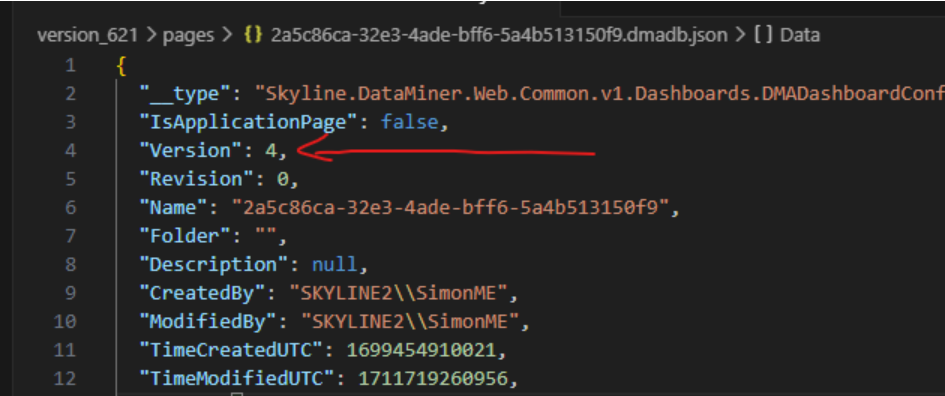
It turns out there is an automatic migration that converts the ThemeKey from the theme name to a GUID. However, in my case the migration did not work because the version value in the JSON pages of my applications was too high.
The expected version before the migration is 4, and the migration updates it to version 5, replacing the theme name with the corresponding GUID (ThemeKey field).
After manually changing the version back to 4 in the JSON files and refreshing the pages, the migration ran successfully. The pages were updated to version 5, and the correct theme was applied again (colors, fonts, etc.).