
Skip to content
DataMiner Dojo

More results...

Generic selectors
Exact matches only
Search in title
Search in content
Post Type Selectors
Search in posts
Search in pages
Search in posts
Search in pages
Log in
Menu
  • Updates & Insights
  • Questions
  • Learning
    • E-learning Courses
    • Tutorials
    • Open Classroom Training
    • Certification
      • DataMiner Fundamentals
      • DataMiner Configurator
      • DataMiner Automation
      • Scripts & Connectors Developer: HTTP Basics
      • Scripts & Connectors Developer: SNMP Basics
      • Visual Overview – Level 1
      • Verify a certificate
    • YouTube Videos
    • Solutions & Use Cases
      • Solutions
      • Use Case Library
    • Agility
      • Learn more about Agile
        • Agile Webspace
        • Everything Agile
          • The Agile Manifesto
          • Best Practices
          • Retro Recipes
        • Methodologies
          • The Scrum Framework
          • Kanban
          • Extreme Programming
        • Roles
          • The Product Owner
          • The Agile Coach
          • The Quality & UX Coach (QX)
      • Book your Agile Fundamentals training
      • Book you Kanban workshop
    • >> Go to DataMiner Docs
  • DevOps
    • About the DevOps Program
    • Sign up for the DevOps Program
    • DataMiner DevOps Support
    • Feature Suggestions
  • Downloads
  • Swag Shop
  • PARTNERS
    • Business Partners
    • Technology Partners
  • Contact
    • Sales, Training & Certification
    • DataMiner Support
    • Global Feedback Survey
  • >> Go to dataminer.services

How to correctly map protocol table columns (Kafka collector) to Alarm Console properties ?

47 views2 hours agoAlarm Console Connector Visible alarms XML
1
A B M Siddique60 22 hours ago 0 Comments

Hi Dojo community !
I’m working on a custom Kafka collector and I’m trying to understand how it maps protocol table columns to the Alarm Console fields.

In my protocol XML, I’ve set all my read parameter :

<code>Monitored = "true"
</code>

This allows me to alarm on the table columns when assigning an alarm template.

However, I’m seeing an issue:

  • When I create an alarm based on a single parameter match (e.g., matching a keyword in one column),
  • The Parameter Description and several other Alarm Console fields remain empty,
  • Which suggests it is not mapping the protocol columns to the Alarm Properties correctly.
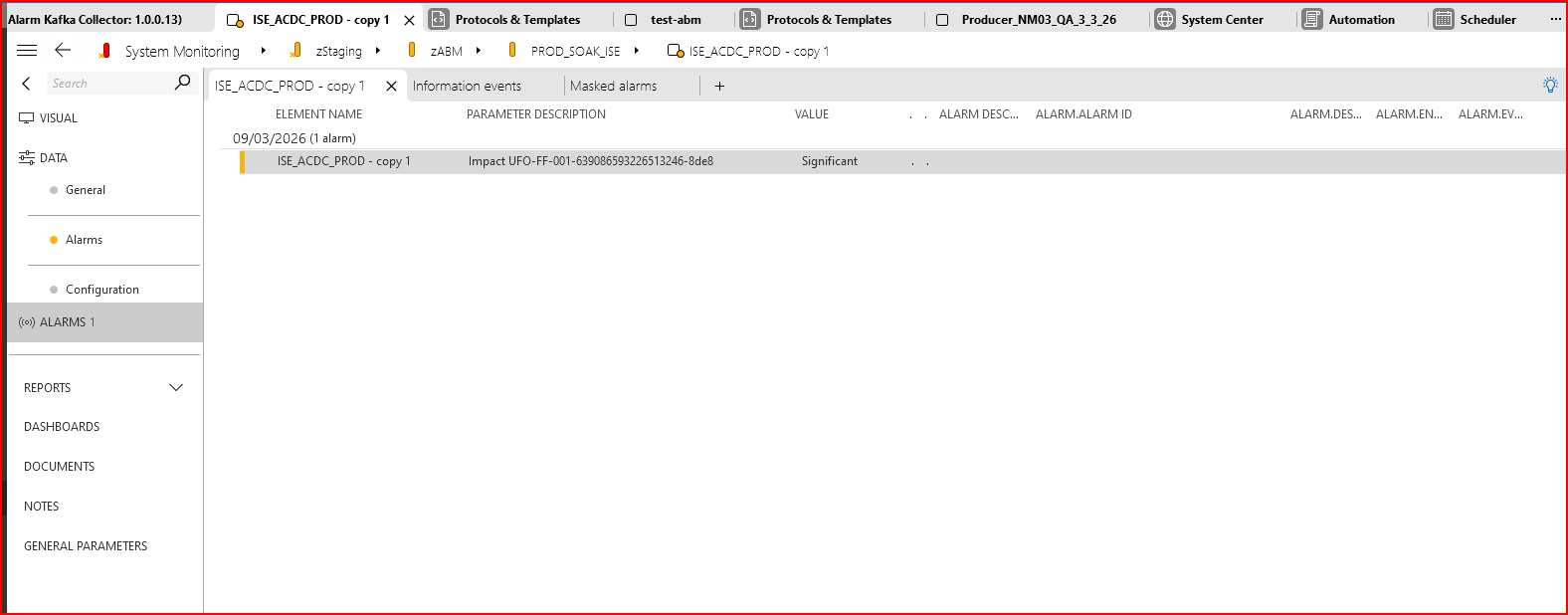
My protocol table has the following columns:

<code> AlarmID  
 AlarmName  
 ApplicationName  
 SubcomponentName  
 Impact  
 Urgency  
 Description  
 SupportingData  
 OperatorActions  
 MessageTimestamp (payload)  
 ReceivedTime (DM)
</code>

My question is:
Is there a documented way (or best practice) to understand which protocol table columns get mapped to each field in the Alarm Console?

For SNMP traps, we rely on OID bindings and can easily map values to Alarm properties.
Is there an equivalent mapping mechanism for non‑SNMP protocols (like Kafka)?
Or a method to ensure columns are being mapped so the Alarm Console fields populate correctly?

My goal is to provide proper baseline visualisation for our operations team, and right now the alarms appear partially empty.

Any guidance, examples, or documentation would be greatly appreciated!

Luís Freitas [SLC] [DevOps Advocate] Answered question 2 hours ago

1 Answer

  • Active
  • Voted
  • Newest
  • Oldest
0
Luís Freitas [SLC] [DevOps Advocate]960 Posted 2 hours ago 1 Comment

Hi A B M Siddique,

You’re correct that for non‑SNMP protocols such as Kafka, there isn’t an equivalent to OID bindings. In these cases, the mapping of protocol table columns to the Alarm Console fields depends entirely on how each parameter is defined in the protocol XML.
To populate the Alarm Console fields the way you expect, you can use the Alarm-options on the parameters you want exposed. In particular:

  • properties – specifies the format and values that should appear in the alarm’s Properties tab.
  • propertyNames – defines the labels that accompany those values.

These options give you explicit control over how table columns are represented in generated alarms.
Documentation reference: options attribute | DataMiner Docs
I hope this helps!

Kind regards,
Luís Freitas

A B M Siddique Posted new comment 18 minutes ago
A B M Siddique commented 18 minutes ago

Thank you very much Luis for your suggestion on this , I will check it out and try to implement it !

Please login to be able to comment or post an answer.

My DevOps rank

DevOps Members get more insights on their profile page.

My user earnings

0 Dojo credits

Spend your credits in our swag shop.

0 Reputation points

Boost your reputation, climb the leaderboard.

Promo banner DataMiner DevOps Professiona Program
DataMiner Integration Studio (DIS)
Empower Katas
Privacy Policy • Terms & Conditions • Contact

© 2026 Skyline Communications. All rights reserved.

DOJO Q&A widget

Can't find what you need?

? Explore the Q&A DataMiner Docs

[ Placeholder content for popup link ] WordPress Download Manager - Best Download Management Plugin