
With every DataMiner Feature Release, we introduce improvements and new capabilities that help you get more value out of your system. In this post, we highlight the most noteworthy additions to DataMiner 10.6.11.
Below, you’ll find a list of the new or improved features that are worth highlighting in this release. Each item links to relevant documentation where you can find more details.
- DataMiner can now be installed and configured in a single unattended operation. Previously, unattended configuration was only possible after DataMiner had already been installed, requiring a separate step to apply the configuration.
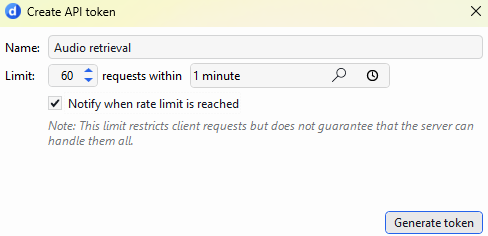
- You can now enable notices that are triggered when a user-defined API token reaches its configured rate limit directly in System Center when creating or editing a token. Previously, this was only possible through the C# API. The new option makes it easier to get a heads-up when a token reaches its limit.
- When enabling Swarming, you can skip the legacy alarm ID analysis if you’ve already run the prerequisites check and resolved any issues it found. This avoids repeating a potentially lengthy check and speeds up enablement, while the other prerequisite checks still run.
- Several improvements have been made to GQI:
- GQI extensions can now retrieve explicitly granted username and password credentials or token credentials from the Credentials Library.
- You can now configure CPU usage limits for the GQI service and its child processes, helping prevent GQI from consuming all available CPU resources.
Critical DataMiner security upgrade
Earlier this month, we published a blog post highlighting several security fixes and recommended upgrading to specific DataMiner releases. These fixes are also included in DataMiner 10.6.11, making this release an excellent choice if you want to benefit from both the latest functionality and the most recent security updates. Read the blog post for more details.

For a complete list of changes added in DataMiner 10.6.11, including technical details and fixes, refer to the official release notes.
Previous DataMiner releases

BLOG
What’s new in DataMiner 10.6.10?
Find out which new and improved features have been added in DataMiner version 10.6.10.

BLOG
What’s new in DataMiner 10.6.9?
Find out which new and improved features have been added in DataMiner version 10.6.9.